
Micro USB to USB Cable SJX-168 Mimacro 2A - White

Micro USB to USB Cable SJX-168 Mimacro 2A - White
Pickup currently not available
White SJX-168 Micro USB Cable is the central expression on this page and unambiguously identifies the presented cable: a Micro USB to USB connection, with the SJX-168 Mimacro reference and the 2A indication in the commercial name. Before choosing, it is important to visually confirm the input of the equipment you intend to connect. Micro USB and USB-C are different connectors; the similarity between cable names does not replace this simple verification.
\n\n\n\n\n\n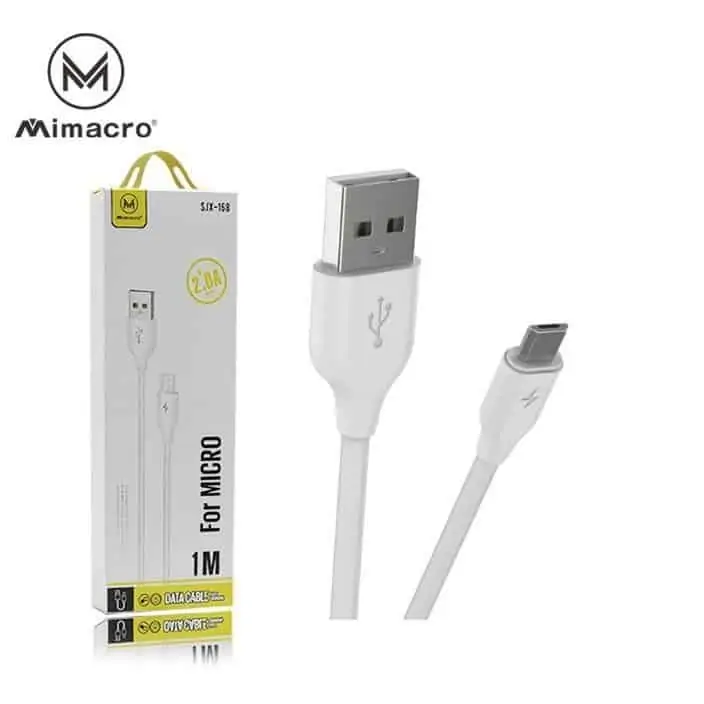
How to identify the White SJX-168 Micro USB Cable
\n\nThe item designation brings together four useful elements for the decision: Micro USB, USB, SJX-168 Mimacro, and white. The first two describe the indicated ends; SJX-168 serves as an identification reference; white distinguishes this visual presentation. The 2A indication is part of the available product name, but should not be used in isolation to conclude that any equipment, charger, or situation will always produce the same electrical result.
\n\nFirst, observe the device port. A Micro USB input has its own shape and should not be confused with Lightning or USB-C. Then, confirm the USB port of the equipment to which you intend to connect the cable. This reading at both ends is more reliable than choosing solely by the mobile phone brand, as different devices may use different connectors.
\n\nIf you want to compare this option with other available accessories, visit the Película de Vidro store and use the full name of each item as a reference. The comparison should focus on the connector type and the actual device, not on assumptions created by similar photographs.
\n\nA quick check before connecting
\n\nPlace the cable and the device on a stable and well-lit surface. Compare the orientation of the plug with the input without pressing it. If the design does not match, stop and observe again. Rotating or forcing an unsuitable plug does not transform one connector into another and can make correct use difficult.
\n\nIt is also advisable to check the equipment that provides the USB port. The cable establishes the connection described in the name; the specific power and communication conditions also depend on the connected devices. For general technical information about the USB family and its respective specifications, you can consult the official USB Implementers Forum document repository. This source helps understand the standard, but does not replace the instructions of each device manufacturer.
\n\nEffortless connection of the White SJX-168 Micro USB Cable
\n\nHold the plug by its rigid body, align it with the port, and insert it straight. Avoid pulling by the wire to disconnect. A controlled gesture reduces tension at the ends and allows you to immediately notice if there is misalignment. If you encounter unusual resistance, remove the plug and confirm the shape and orientation again.
\n\nThe cable does not require an installation similar to that of an application. The important part is the physical match between connectors. After connecting, observe the behavior shown by the equipment itself. It is not prudent to promise a function or speed based solely on the appearance of the cable; the result depends on the combination of the cable, the USB source, and the Micro USB device.
\n\nWhite as an identification element
\n\nThe white color can be useful to distinguish this cable among several accessories stored in the same space. This is a visual characteristic confirmed by the title and the existing image, not an indication of performance. For even clearer identification, keep it separate from cables with similar plugs and avoid tight coils near the connectors.
\n\nWhen not in use, choose a dry place, without heavy objects on top and without sharp bends. Before a new connection, a quick visual inspection allows you to detect dirt, deformation, or obvious damage. If the plug or the coating shows visible changes, do not force its use. These precautions are general handling practices and do not add features that the original page does not confirm.
\n\nSpecific questions about this reference
\n\nIs this a USB-C cable?
No. The name identifies one Micro USB end and one USB end. If your equipment has USB-C, look for an option whose title expressly indicates that connector.
Is the reference SJX-168?
Yes. SJX-168 Mimacro appears in the available identification of the item and allows you to distinguish it from cables with other references.
Is the presented color white?
Yes. The title and the existing image identify this version as white.
Does the 2A indication always guarantee the same charging?
It should not be interpreted as an isolated promise. “2A” is part of the shown commercial name; the actual behavior also depends on the USB source and the connected device.
How to avoid choosing the wrong connector?
Compare the actual port of the device with the plug, consult the equipment manual when necessary, and confirm that you are looking for Micro USB to USB. This simple sequence is safer than deducing compatibility solely by the brand.
In summary, the White SJX-168 Micro USB Cable should be chosen by the explicit match of the connectors, the SJX-168 Mimacro reference, and the indicated color. The page is limited to the data that can be confirmed, explains how to perform the physical check, and avoids turning a commercial designation into a technical promise.